Showing posts with label learning. Show all posts

Monday, 22 February 2016

Comparing with the previous row using Microsoft Power BI

This is something which has come up recently at work which at first glance seems like it should be straight forward (tl;dr it is when you know how) but if you're new to Power BI or Power Pivot then it's something which takes some thinking about.  Please note that for this post I will be sticking with Power BI, but if you want to see how this can work with Power Pivot then have a look at Dany Hoter's post over at PowerPivot(Pro).

The Problem

Let's say that you have some data, which is spread over time and you want to be able to create a BI visualisation showing how that value changes as a delta from the previous value.

Implementing a solution

To walk through how to do this, in a way which is hopefully easy to follow, I'm going to grab some sample data which is available on-line.  That data is is the Annual Sheep Population in England & Wales 1867 - 1939 (measured in 1000's) from DataMarket.  No idea why I picked sheep populations but there we go.

The goal here is to be able to create a simple chart which can show the sheep population for a given year and the population difference from the previous year (except for 1867 which should show a difference of 0).

So step 1 is to go and download the data, I've opted for CSV for this example but if you want to try another format then go for it.  Once you've downloaded the data fire up Power BI.

Connecting to the data source

Once Power BI has opened hit "Get Data" to connect to your data source and follow these steps:

Getting data into Power BI
  1. Select the CSV connector
  2. Navigate to and open the sample data set from your local machine
  3. Once the preview window has opened select the "Edit" button

Configuring your data source

One of the first things I've done is renamed the query over in the Query Properties section to "sheep", you don't have to do this but it makes things easier to read for me and also makes the screen shots a little less cluttered.

If you look at your data in the Query Editor window and scroll to the bottom you'll see that there are 3 rows which were in the CSV file which aren't part of the data.  To get rid of these select the "Remove Rows" button from the ribbon and then select the "Remove Bottom Rows" option.  When the option dialog appears enter the value "3" and press "OK", this will remove the rows from the bottom of the data set (scroll down and check).

Removing rows from the query
Next we'll rename the columns to "Year" and "Annual Population", the first of these is fine but the second column will need to be changed, do this by right-clicking on the column title and selecting the "Rename" option.  Alternatively you can select the column and use the "Rename" item in the "Transform" ribbon section.

Now right-click on each column title and under "Change Type" select the "Whole Number" option.  This will ensure that we are working with the data correctly, and you'll notice that the year was mostly likely set to "Text" because of the content of the rows we previously removed.

Almost there, now we need to sort the "Year" column in ascending order, you can use the options in the ribbon or click on the drop-down menu next to the column title and select the correct sort option.

Finally we need to add an index column (we'll see why in a bit) to the data source, in the "Add Column" ribbon.  If you don't select any options then the default is to start from zero, which we'll do in this example, but you can choose to start from 1 or a custom value with a custom increment.  You can leave this new column name as Index.

Adding the index column
Now that we've done all of the prep work you can click the "Close & Apply" option under the Home section in the ribbon.

Creating the new population difference column

Back in Power BI we'll need to be under the "Data" section on the left.
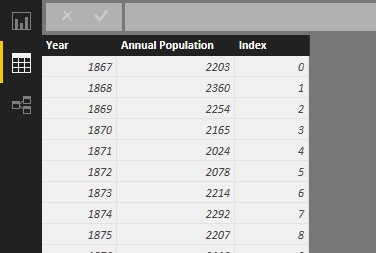
Viewing the data in Power BI
From here add a new column to the data collection by right clicking on the "sheep" (or originally named query if you didn't change it earlier) and selecting the "New Column" option.

Adding a new column to the query
You'll now have a new column imaginatively called "Column" and a query expression editor at the top.  Just to get something for the moment let's enter the following:
Column = SUM(sheep[Annual Population]) 
This will give us a new column called column where every row will now have the sum of the Annual Population column.

Our first new column
As you can see this isn't particularly useful so lets change that expression to something a bit more useful for our purposes.
Population Difference =
'sheep'[Annual Population] - IF(
'sheep'[Index] = 0,
'sheep'[Annual Population],
LOOKUPVALUE(
'sheep'[Annual Population],
'sheep'[Index],
'sheep'[Index]-1)
)
That's quite a lot to take in so we'll break it down a bit and talk through what this is doing.

The first bit is quite simple as we're just saying to take the current sheep population and subtract a number from it.  When we get to the IF statement we're checking to see if the current Index is 0 (I created my Index column to start from zero) and if it is return the current sheep population, this is so that we get a difference value of 0.  If the current index is not zero then we're doing a lookup, with this we're looking up the sheep population value by checking the Index column for a value which is the current Index value less 1 (i.e. the previous value).

If we change our column to this expression we should get the following.

Our data with a population difference value

Visualizing the data

From here we can go back into the Reports section and create a number of visualizations against this data.  Here I've provided an example where I'm using the "Line and Stacked Column Chart" visualization with the annual population for the column values and the population difference for the population difference.  Play around with it and see what looks good for you though.

Visualizing the data

I've provided the data and the pbix file for download if you want to have a look at the version I've put together and play around with it.  Just click on the OneDrive link below.


Coming up next...

One other thing that comes up once in a while is producing a moving value such as a moving average. Next post we'll extend this basic example to show how we can accomplish this.

Wednesday, 24 October 2012

Playing around with Go, prime numbers and ancient Greece

I've been playing around with Google Go (golang if you want to Google it) a lot lately as I've been of sick and needed something to stop me from going nuts.  It's been a while since I played with the language properly and so I started off by reading through a new book which has been written by Caleb Doxsey entitled An Introduction to Programming in Go which you can read for free on-line (or download as a PDF) or purchase from Amazon.  I read it for free on-line but purchased a Kindle copy of it from Amazon afterwards as it's a really good book and really well priced.

So after going through the book I needed something to practice on, not wanting to throw myself into an active project I decided to head over to Project Euler.  A great resource if you want to practice using a language without resorting to made up scenarios or over elaborate "Hello World" applications.  There are a number of problems (399 at the time of writing) which are mathematical/programming based in nature.  If you're not too good at maths or it's been a while since you were in full time education then you may need to Google a bit to get an idea of the problem but they're not beyond the average person.

The Problem

The one I want to look at here specifically is problem 7 which (at the time of writing) is a problem to find the 10,001st prime number.  There are two obvious ways to solve this, the first being a prime number generator.  This is a function which keeps on incrementing a count, checks to see if the next number is prime and if it is the number is returned from the function.  The second method is to use a sieve, this takes a sequence of numbers and "removes" all of the ones which are not prime numbers, it does this by:

1. Create a sequence of numbers, marking each as a "prime candidate"
2. Starting from 2, check to see if the entry is marked as a prime candidate
  a. If the entry is a prime candidate then mark each multiple in the sequence as non-prime
3. Return the collection of prime of numbers still marked as prime candidates as the final set of prime numbers

This is an over-simplified explanation of the process, for a more detailed explanation see the Wikipedia entry on the Sieve of Eratosthenes.

The issue with creating a sieve is that you must specify an upper limit, that is to say "find all prime numbers less than N".  The problem however poses the question as "find the first N prime numbers".  This means that in order to use a sieve we have to know roughly where the Nth prime will be, or use a high enough limit to generate enough primes to get N.  Because of this it would seem that using a generator would be a better option.  One thing to keep in mind is that, although there is no time limit to the problems, generally speaking if the solution takes longer than a minute then it may not be the best solution.

The Solution

Before I start

One thing I should probably mention here is that I'm only checking to see if a number is divisible by prime numbers instead of checking for all possible divisors.  The theory here is Prime Factorization.  So a prime number is a number which is only divisible by 1 and itself, other positive integers (other than 1 which is special) are composite numbers, meaning that they are divisible by integers other than 1 and themselves.  Consider the number 20, this can be decomposed as follows:

20 / 2 = 10
10 / 2 = 5
5 / 5 = 1

So the number 20 can be represented as 2 x 2 x 5 (or 2^2 x 5).

Because numbers which are not primes must be evenly divisible by at least one prime number less than itself then this reduces the number of numbers to check for to see if a number is prime.

Solution 1

Because I wanted to play with Go I took the opportunity to create a prime number generator using goroutines (think light-weight threads).  This was done by creating a number "emitter" at one end and a "listener" at another end, when a number leaves the emitter it passes through a series of checkers, these check to see if the number is evenly divisible by a given prime number.  So the first checker will check to see if the number is evenly divisible by 2, if not then it is passed to the next checker which checks to see if it is evenly divisible by 3.  The "listener" watches the output from the last checker, if a number appears here then it is not divisible by any of the currently known primes and so must be a prime number itself.  In this event, the listener creates a new checker for the new prime number which listens to the output from the last checker, the listener then listens for output from this new checker, it also puts the new prime number into a channel and waits for it to be read by the client.

Emitter > Check For 2 > Check For 3 > Check For 5 > Listener

In implementation I thought this to be a rather elegant solution, however for production use this turns out to be quite a time consuming exercise.  It allowed me however to play with channels and goroutines and so was incredibly useful.  Next up I decided to implement a similar generator again, but without goroutines and channels.


Solution 2

This solution is more simple as it simply builds up a list of prime numbers and runs in a single goroutine (the main one).  The theory is almost identical though; keep on checking numbers to see if they are evenly divisible by the current list of known prime numbers, if not then it is a prime number and add it to the list.  The implementation this time takes a number which is the Nth prime to find, this means that the function will keep on running until it has found that many prime numbers and will return the last one found.

This was straight forward to implement and ran so much faster than the first solution (something along the lines of 38 seconds for solution 1 to 6 seconds for solution 2).  But I still felt that it was too slow.

Solution 3 - The Prime Sieve

So I investigated the sieve solution.  I gave a brief outline of what is required above but there are a couple of optimizations to be made.  The first is that for a given sequence of numbers you only need to look for prime numbers up to the square root of the limit, numbers after this point are either multiples of the prime numbers discovered to that point, or are prime numbers themselves.  Say we wanted to find all of the prime numbers up to 16 then we would limit ourselves to only looking up to 4 (the square root of 16):


1 N/A
2 Prime Number
3 Prime Number
4 Divisible by 2
Search limit
5 Prime Number
6 Divisible by 3
7 Prime Number
8 Divisible by 2
9 Divisible by 3
10 Divisible by 2
11 Prime Number
12 Divisible by 2
13 Prime Number
14 Divisible by 2

The second optimization is fairly obvious from the table above, every even number with the exception of 2 is non-prime.  This means that we can initially mark every even candidate as non-prime (except 2), then starting from 3 check every odd number (e.g. 3, 5, 7, 9...), this halves the number of candidates which need checking.

In order to get around the "known limit" problem I implemented the solution to sieve out all primes up to 1,000,000 (a suitably large number I thought).  There are ways in which you can determine the upper limit, but the math is a bit beyond me right now, this is Prime Number Theorem, feel free to take a look.  If this were implemented then we would be checking fewer potential candidates meaning less work again.

(Edit, thanks to compoasso from the comments I implemented a function to get the upper limit so that it is no longer checking from primes up to 1 million)

I didn't hold out much hope for this solution as I am sieving for primes in a large data set to find 1 specific number, so I figured I that I wasn't going to do much better than the ~6 seconds from solution 2.  So the result surprised me a little.  After putting together the solution and running it with the "time" command on my HP Mini 210 (Intel Atom N450, dual core 1.6Ghz) running Ubuntu Linux I got the correct result in 98 milliseconds!


So, what now?

Well, if you want to check out the full source files you can find them on GitHub along with the above snippets.

I absolutely love playing with Go, it is very much like creating C++ application but with the convenience of something like Python or Ruby.  Project Euler is a great playground for experimenting with new languages as well, it also allows you to think about how to create a solution which is appropriate to the language (instead of making a generic solution work across all languages).

Now I just need to remember to keep on posting :-)

Friday, 16 December 2011

C++11: Lambda Expressions

Posts in this series
Getting started with C++11
C++11: Initializer lists and range-for statements

So what is a lambda expression?
A lambda expression is way in which to write a function in-line in your code, the typical use case is where you call a function which expects a pointer to another function in order to tailor it to your own needs.  For example, if you had a list of integers (4, 1, 6, 2, 13) and you wanted them sorting, you would typically call a sort method, passing it your list of integers.  Now that sort method may accept a pointer to another function in which you can specify how your list is to be sorted, typically this means that you would have one function defining how to sort in an ascending manner, and another defining a descending manner.  Lets start with an example as to how you would currently do this.
  • bool SortAscending(const int x, const int y)
  • {
  •     return x < y;
  • }
  • ...
  • vector<int> myList = { 4, 1, 6, 2, 13 };
  • sort(myList.begin(), myList.end(), SortAscending); // 1, 2, 4, 6, 13
Full example code

So now, if we wanted to sort this in a descending manner then we would need to write a new method to tell the sort algorithm how to sort the values and pass this to the sort method.

This is a really simple function so why do we have to write a whole method for it?  Well using lambda expressions we no longer have to, with the above being written as follows instead.
  • vector<int> myList = { 4, 1, 6, 2, 13 };
  • sort(myList.begin(), myList.end(), [](int x, int y) -> bool { return x < y; }); // 1, 2, 4, 6, 13
Full example code|

So what did we do here?  Well lets have a look at the lambda expression.
  • [](int x, int y) -> bool { return x < y; }
The opening brackets "[]" is a capture list, more on this later.  Next we define the expressions parameter list "(int x, int y)" just as we would if we were defining a normal method.

The next part is the return type "-> bool", this is an optional part of the expression and we could have easily left it out as the compiler can easily determine from the expression body that the return type is a bool; if the return type is not specified and the expression body does not return any value then a return type of void is deduced.  It is useful, however, to specify a return type if you want to explicitly instruct the compiler what the type being returned should be.

Finally there is the expression body which is every between the "{}" braces.

Capture lists
Sometimes when we use lambda expressions we may want to use or modify values from the surrounding code.  Normally we would just pass these in using a parameter, but with lambda expressions we have to provide a parameter list which the receiving method is expecting, in the case of the sort algorithm method, it is expecting an expression which takes two integers and returns a bool.

To access these surrounding values we can use capture lists.  You've already seen a simple use of a capture list in the previous example where we wrote "[]", this tells the compiler that we are not capturing any values for use in the lambda expression.  In this next example we are going to capture an integer variable called "stepCount" which will be incremented each time our lambda expression is used by the sort algorithm, this will tell us how many times the expression was used to completely sort our list.
  • int stepCount = 0;
  • sort(myList.begin(), myList.end(), [&](int x, int y) -> bool { ++stepCount; return x < y; }); // stepCount is 9
Full example code

The capture list this time is written as "[&]", this instructs the compiler to capture any local variables used in the lambda expression and pass-by-reference.  This allows us to have the sort method update a local variable in our calling code.  Another option for the capture list is "[=]" which tells the compiler to pass-by-value.  If we were to use this in our code however we would get a compiler error as any values passed by value are read-only.

There are other options available for capture lists, these are as follows:

[] Capture nothing
[&] Capture variables by reference
[=] Capture variables by value (make a copy)
[=,&foo] Capture foo by reference, all other variable by value
[foo] Only capture foo and do so by value
[this] Capture the this pointer of the enclosing class

One thing to be careful of here however is that if you return a lambda expression from a method (we'll see how in a second) and you are using a local variable in that method and capturing by reference then you are going to run into problems as the moment you return the expression the local variable you captured as gone out of scope.  Other than that hopefully you can see just how useful these are by now.

Accepting lambda expressions in my own code
One of the great new features in C++11 is the std::function type (and std::bind which I'll cover in a later post) which is a great way for us to start passing around lambda expressions as parameters or return types; in fact it allows us to use lambda expressions and functions.  The structure of the type is std::function<return_type (parameter list)>, so if we wanted to write a method that accepted a lambda expression we could write the following.
  • double Sum(const vector<double>& values, function<double (double x)> f)
  • {
  •     double result = 0.0;
  •     for (auto d : values)
  •     {
  •         result += f(d);
  •     }
  •     return result;
  • }
The "f" parameter is a function which takes a single double parameter and which returns a double value, this is then used in the method body as part of the accumulation process.  The method can then be used as follows.
  • double Complex(double x)
  • {
  •     double result = sin(x * 3.14159265);
  •     result -= floor(result);
  •     
  •     return result;
  • }
  • int main(int argc, char** argv)
  • {
  •     vector myValues = { 1.3, 2.1, 7.4, 9.6 };
  •     
  •     double result1 = Sum(myValues, [](double x) { return x; }); // 20.4
  •     double result2 = Sum(myValues, Complex); // 0.597887
  • }
Full example code

Here we're calling the "Sum" method twice, the first time with a lambda expression which simply returns the value passed into it so that we sum all of the values.  The second call passes a reference to the "Complex" method, which may not be that complex but illustrates the point about being able to pass standard methods as well as lambda expressions.

Lambda expressions provide an easy and convenient method of providing short functions to other other functions which require thema.  Even if you're not sure if you want to use lambda expressions, making sure that your methods use the std::function type means that you can carry on writing helper functions if you want to but that you or others have the option of using lambda expressions if they want to.

For the next post I should be looking at smart pointers, these give us the benefits of pointers in C++ but also provide better memory management, which can only be a good thing

References
CProgramming.com - Lambda Expressions in C++ - the definitive guide
Bjarne Stroustrup - C++11 FAQ

All code provided in this article is provided under a BSD license.  If you spot an error then please do let me know so that we can make this better for anyone else reading it.
Creative Commons Licence
This work is licensed under a Creative Commons Attribution-ShareAlike 3.0 Unported License.

Tuesday, 8 March 2011

Staying in the game

One of my biggest concerns as a developer (and I have quite a few) is being able to stay relevant.  This doesn't necessarily mean making myself the only go-to-guy for a project or getting upset when I'm not invited to meetings but staying relevant as an experienced developer.

So to stay relevant what do I need to do?

Well the first thing is to keep my existing skill-set up-to-date, calling myself a .NET developer is all well and good but if I only know about version 1.1 and not 2, 3, 3.5 and 4 then how useful am I and how am I able to help influence technical direction if I don't know about what's new!

Next is a harsh one, but necessary.  Know when to move on from an existing skill.  I know we all feel comfortable with what we know but if you're a C++ programmer and there are no C++ based programmes left to maintain or write then should you spend as much - if any - time investing in those skills.  I'm not saying forget about them, and from time-to-time it's nice to come back and brush up a little but sticking with it as a core skill means you'll be slowly phased out like the programmes you maintain.

Try to keep up-to-date with new theories and practices.  Some times people do re-invent the wheel and sometimes it's a good thing, maybe it's a new design pattern or a new way of looking at threading; but knowing about these can help make you a better programmer.

Keep your eye on the horizon.  Sounds a little managerial I know but looking at what's coming up is really useful as it will help to figure out where you should be spending your time.  Maybe looking at a new language instead of an entrenched one will help with a new product or problem that you know is coming up, or maybe it might just be more fun.

Enjoy what you do.  Sounds obvious but you go to work every day and churn out code without really enjoying it you wont have the motivation to spend the time learning new things and before you know it you're out of touch and out of date.  This can be a tricky one though, if the project you're on isn't that interesting then how can you stay enthused about it?  Well look for little things around the project you can do in your spare time to make it more interesting, such as writing a little app to make a repetative task more efficient.  Contribute to an open-source project you like or just write a little app for yourself, some of the best applications have been written to scratch your own itch.

The last thing is a tricky one for some people but here goes.  You DO NOT know it all, you might have at some point but things move on, and quickly so you will need to as well.  But there are people at the other end of this scale and to those people I say you DO know something, there is no such thing as a perpetual noob, every day you learn something you're more experienced than the day before.  Look at it this way as well, even people who write programming languages don't know every little aspect of it as other people contribute ideas and write libraries and frameworks and they don't know how all of them work!